Now when you exit the Yahoo! Messenger app on your iPhone but are still signed in, you?ll show as available to your friends rather than Idle. We agreed ? showing up as idle didn?t make great sense since you want people to IM you.
Ok, not every feature off the blocks is perfect and this one took some tweaking. In this version we?ve refined the Buzz notification sound and added a preference to turn Buzz on or off in the event you don?t want to use it (under Settings).
We also added vibrating notifications when you send or receive a Buzz. And if you?re in a conversation with someone and another friend buzzes you, you?ll see a notice on the screen.
Oh your bleeding ears! We heard you didn?t like the new IM notification sound so we changed it up a bit. Karl the engineer describes it as ?shorter and prettier?. We hope you agree.
The iPhone address book integration faltered in our last version so we fixed it in 1.2.2. Now when you?re composing a new SMS for example, you?ll be able to access numbers in your iPhone address book, not just in Yahoo! Messenger.
We also tweaked a few things to address some bugs, crash and login issues.
To download the latest version of Yahoo! Messenger for iPhone (v1.2.2) that includes these updates,
or tap the App Store icon on your iPhone and search for Yahoo! Messenger. If you already have Yahoo! Messenger installed, you may also have an update alert for the app.
As always, please use the Report Problem feature in the app if you run into any issues. You?ll find it under ?Settings? in the Yahoo! Messenger for iPhone app.
Yahoo! Messenger 10 Beta Tips for making video calls Hopefully many of you have been able to try out the new video call feature in Yahoo! Messenger 10 Beta. We?ve heard from some of you that you?re enjoying it, but we?ve also heard that some are having problems with the feature. Here is a short FAQ about video calling in Yahoo! Messenger 10, including some troubleshooting steps to take if you are having issues.
Is there a minimum set of requirements that I need to meet before I can make video calls?Yes, there are and you can see the
complete list of requirements on our help page. Below are a few tips for ensuring the best video call experience:
- A computer with the Windows XP operating system or later, a 1 GHz CPU processor and 512 MB of RAM.
- Broadband Internet connection speed: Minimum of 300 Kbps download and 128 Kbps upload.
- Video card: Minimum of 96 MB memory.
- Webcam: Follow manufacturer instructions for ensuring proper webcam installation, including the use of the installation CD.
- Be sure you have the latest version of
Microsoft DirectX� installed.
To test whether your webcam will work with our video call feature, go to our
webcam detection help page.
I meet the minimum requirements. Can I start my video call?Yes but we advise you that you go through
the recommended steps to make your first video call. This can help you avoid most issues or problems. For example, make sure you run the video and voice call setup wizard before you place your first call. You?ll find it under Messenger > Preferences > Video & Voice Devices > ?Open Video and Voice Setup? link.
Why is the Video Call button greyed out in my IM window?Video calling is only available to users on Yahoo! Messenger 10. You and your friend both need to have Yahoo! Messenger 10 installed to make video calls. If your friend is not sure of their version, tell them to go to Help > About Yahoo! Messenger and check the version number. If they?re not on 10, they can
download it from the Yahoo! Messenger website.
Why does my video call hang up after ringing for several seconds with no answer?There is no voicemail available for video calls. As a result, your call will ring and then automatically hang up if no one answers after several seconds.
I have my webcam connected ? however, the Video and Voice Setup instruction within Messenger cannot detect my Webcam?To diagnose this issue, please try the following:
1) Connect your webcam to the computer and go to the
webcam detection page.
2) If you are unable to see your own video at the above link, please follow instructions from your webcam manufacturer?s installation CD to install the webcam drivers. This should fix your webcam detection problem that you are facing. If you no longer have the CD, visit the manufacturer?s website; they typically offer the latest drivers in their support section.
3) If you are able to see your own video then please submit your messenger diagnostic logs for us to debug the issue.
Get instructions on how to submit your logs My friend?s video does not appear (window appears black) during a video callThere could be several reasons why your friend?s video does not appear during a video call. First, ensure that your friend is also on Yahoo! Messenger 10 Beta. If they are but their video still does not appear, then please
ask your friend to follow the instructions here to help figure out the problem.
We appreciate your patience and help in making sure that our new Beta can work with as many webcams as possible. Thanks,
Download Yahoo! Messenger 10 Beta, Officialy Released by Yahoo
What All New in New Yahoo Messenger 10
Enhanced video callingFeel like you?re there with high-quality, full screen video and voice calling
Keep up with what your friends are doingSee your friends? latest updates from Yahoo!, Flickr, Twitter and more with the new ?Updates? view
Improved language supportChange your preferred language in Yahoo! Messenger with just a few clicks
Features of Yahoo Messenger 10
- New ?Y! Updates? view of your contact list
- Find more to chat about
- All-new Yahoo! Insider
- Change your language easily
- New ways to sort your contacts
- New icons in the IM window
For More Info Read Yahoo Messenger Blog : http://www.ymessengerblog.com/blog/
Download the Yahoo Messenger 10
From Yahoo Server :
http://messenger.yahoo.com/download/winbeta/Mirror link : http://www.easy-share.com/1907478908/ymsgr1000_525_us.exeWorking yahoo messenger pic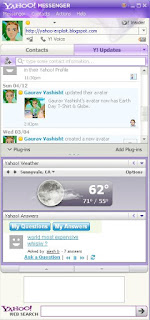





 10.00 out of 10 (1 Votes)


